macOS Widget
The VirtualProg Widget lets you monitor your virtual machines directly from the macOS desktop or Notification Center.
Once enabled in Settings, the widget displays the current status of all your virtual machines in real time, updating automatically whenever a VM starts, stops, pauses, or is suspended.
🔧 Enabling the Widget
Before adding the widget, you must enable it in VirtualProg:
- Open VirtualProg → Settings → Interface
- Turn on the Widget toggle
⚠️ The widget will not display any data until this setting is enabled.
➕ Adding the Widget to Your Desktop
- Right-click on the macOS desktop
- Click Edit Widgets
- Search for VirtualProg
- Choose your preferred widget size and click the + button to add it
📐 Widget Sizes
VirtualProg provides three widget sizes to suit your workflow.
Small
📸 Screenshot:
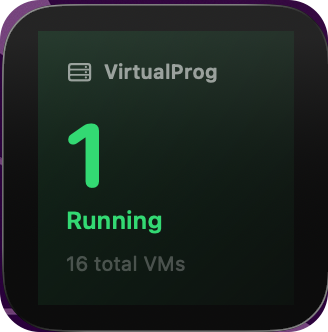
Displays a compact summary of your virtual machines:
- Running count — number of currently running VMs shown prominently
- Total VMs — total number of virtual machines
Medium
📸 Screenshot:
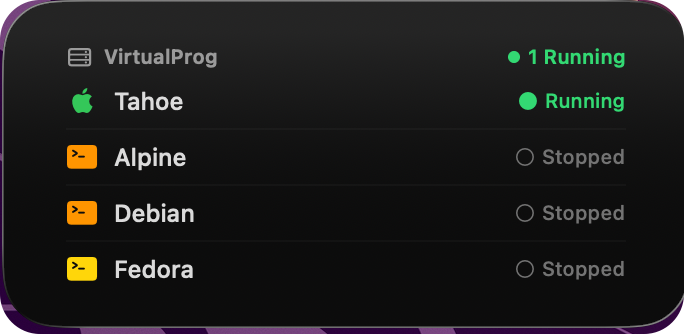
Displays a list of up to 4 virtual machines with:
- VM name
- OS icon — Apple logo for macOS VMs, terminal icon for Linux VMs
- Status indicator — colour-coded dot and label (Running, Paused, Suspended, Stopped)
- Running count badge at the top right
Large
📸 Screenshot:
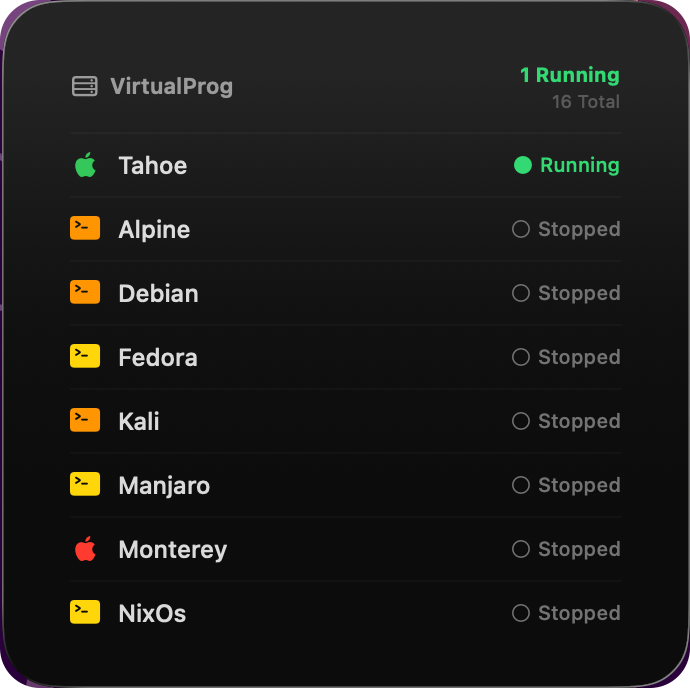
Displays up to 8 virtual machines, sorted by status (Running → Paused → Suspended → Stopped), with the same detail as the Medium widget.
🎨 Status Colors
| Status | Color |
|---|---|
| Running | 🟢 Green |
| Paused | 🟡 Yellow |
| Suspended | 🔵 Blue |
| Stopped | ⚫ Grey |
🔄 How Updates Work
The widget refreshes automatically whenever a VM changes state inside VirtualProg. No manual refresh is needed.
If you disable the Widget toggle in Settings, the widget will immediately clear and show no data.
💡 For the best experience, keep VirtualProg running in the background with the Menu Bar Icon enabled so it can push updates to the widget at all times.