Startup & Shutdown
Control how this virtual machine starts up automatically and how it responds to sleep, shutdown, window close, and inactivity events.
📸 Screenshot:
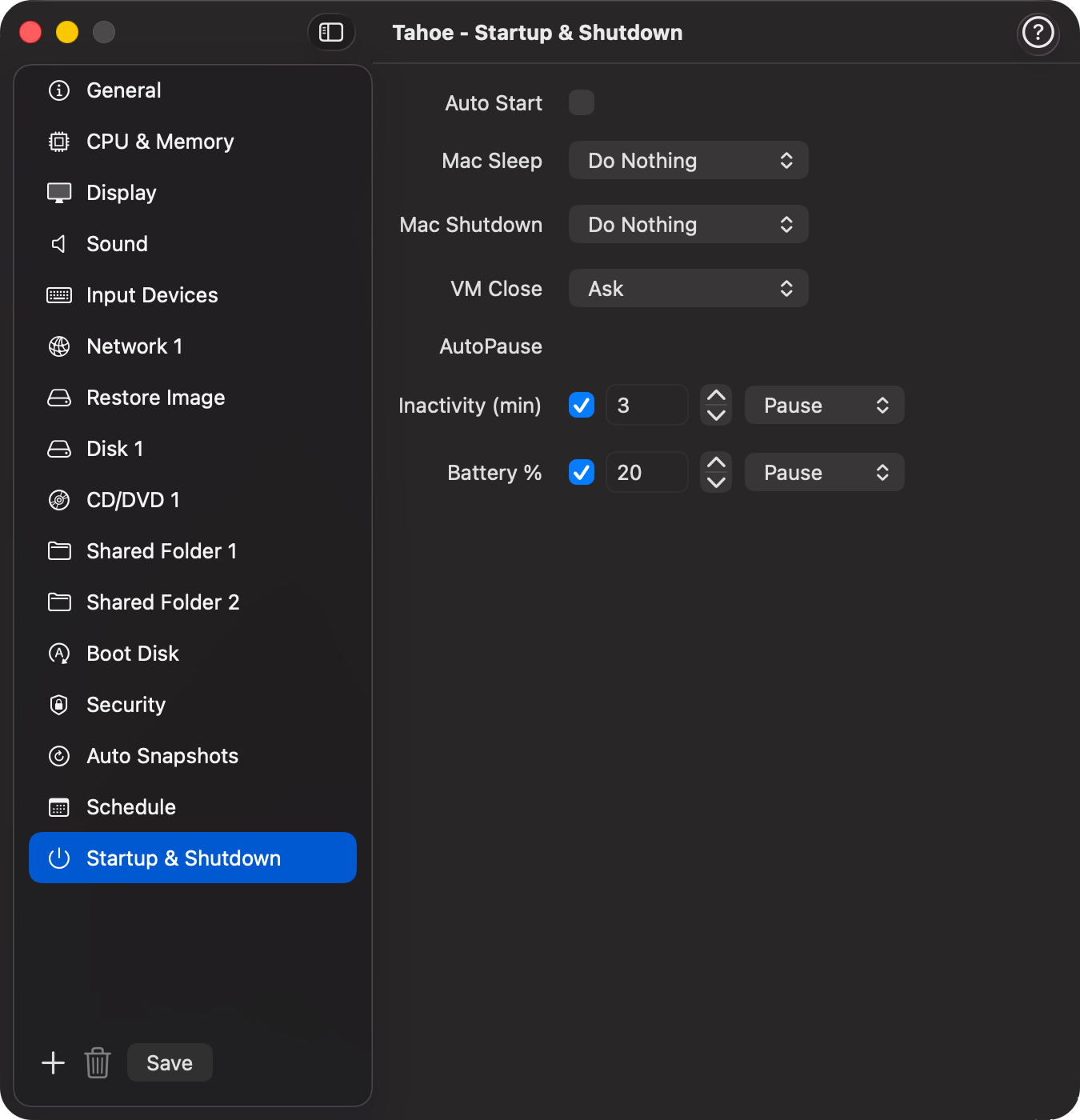
Fields
| Field | Description |
|---|---|
| Auto Start | Start this VM automatically when VirtualProg launches. |
| Startup Delay | Delay in seconds before the VM starts after the app launches. Useful when multiple VMs are set to auto-start and you want to stagger them. |
| Mac Sleep | Controls what happens to this VM when the Mac goes to sleep. |
| Mac Shutdown | Controls what happens to this VM when the Mac shuts down or restarts. |
| VM Close | Controls what happens when the VM window is closed while the VM is running. |
| Auto Actions | Automatically perform actions like pause, suspend, or shutdown based on inactivity or low battery. |
Mac Sleep
Defines how the VM behaves when the Mac sleeps (lid close, sleep menu, or inactivity timeout).
| Option | Description |
|---|---|
| Do Nothing | The VM keeps running while the Mac sleeps. Best for always-on headless VMs. This is the default. |
| Pause | The VM is paused when the Mac sleeps and automatically resumed when the Mac wakes. The VM's in-memory state is preserved. |
| Suspend | The VM's state is saved to disk and the VM is stopped. On wake, the VM is automatically restored from the saved state. Frees memory while the Mac sleeps. Available on Apple Silicon only. |
| Stop | The VM is immediately force-stopped when the Mac sleeps. Use this only if the guest OS does not respond to graceful shutdown. |
| Shutdown | The VM is gracefully stopped when the Mac sleeps. It will not restart automatically on wake — you start it manually when needed. |
Note: Headless VMs default to Do Nothing since they are designed to run continuously. You can change this if you want them to pause or stop during sleep.
Mac Shutdown
Defines how the VM behaves when the Mac shuts down or restarts.
| Option | Description |
|---|---|
| Do Nothing | The VM is left running. macOS will force-terminate it as part of the shutdown process. This is the default. |
| Suspend | The VM's state is saved to disk before shutdown. The next time you open VirtualProg the VM can be resumed exactly where it left off. Available on Apple Silicon only. |
| Stop | The VM is immediately force-stopped before the Mac shuts down. |
| Shutdown | A graceful shutdown request is sent to the guest OS before the Mac shuts down. |
Note: If Do Nothing is selected and the VM is running when you shut down the Mac, VirtualProg will block the shutdown and ask you to stop the VM first. For any other option, VirtualProg waits up to 30 seconds for the VM to stop before allowing the shutdown to proceed.
VM Close
Defines how the VM behaves when you close the VM window while it is running.
| Option | Description |
|---|---|
| Ask | A confirmation dialog is shown before stopping and closing the VM. This is the default. |
| Stop | The VM is immediately force-stopped and the window closes with no confirmation. |
| Suspend | The VM's state is saved to disk and the window closes. The next time you open the VM it resumes exactly where it left off. Available on Apple Silicon only. |
| Shutdown | A graceful shutdown request is sent to the guest OS. If the guest accepts it the VM stops and the window closes automatically. If the guest ignores the request the window stays open and the VM keeps running. |
| Background | The window closes but the VM keeps running. The VM remains accessible — right-click it in the VM list and choose Open Display to reattach the window at any time. Remote control via the Web Dashboard also continues to work while the VM is in the background. |
Auto Pause / Suspend / Shutdown / Stop
Configure automatic actions to take when the virtual machine is idle or when the host's battery level is low. This helps conserve system resources and battery life.
Inactivity (min) - Automatically perform a selected action after a period of no user interaction. - The inactivity threshold and action are configured per VM. - Default is disabled. When enabled, the default timeout is 3 minutes and the default action is Pause.
Battery % - Automatically perform a selected action when the host's battery level falls below a specified threshold. - The battery threshold and action are configured per VM. - Default is disabled. When enabled, the default threshold is 20% and the default action is Pause.
Available Actions
| Action | Description |
|---|---|
| Pause | The VM is paused. You can resume it by clicking anywhere in the VM window or pressing any key. |
| Suspend | The VM's state is saved to disk and the VM is stopped. Resuming will restore the VM to its exact previous state. Available on Apple Silicon only. |
| Shutdown | A graceful shutdown request is sent to the guest operating system. |
| Stop | The VM is immediately force-stopped. |
Note: These automatic actions only apply while the VM window is open. Headless VMs are not affected.