🔀 iOS vs Android
The iOS and Android apps are designed to match: the same screens, the same flow, the same commands. This page lists what is different, so you can find the right steps on your device.
Reading the help on Android? "iPhone" means your phone and "iPad" means your tablet.
🧭 Navigation and Layout
| Area | iPhone / iPad | Android |
|---|---|---|
| Phone | One screen at a time; ⋯ menu opens Library, Security and Tools | The same |
| Tablet sidebar | Settings → iPad Layout → Sidebar | Settings → Layout → Sidebar layout on tablets, only when the window is at least 840 dp wide |
| Columns | Sidebar, VM list and details; a toolbar button hides and shows them | The same — the button is at the left of each title bar. The divider between the list and the details can be dragged to resize the list |
| Back | Back button or swipe from the edge | Back button or the system back gesture |
| Row actions | Swipe a row, or tap ••• | Swipe a row, or tap ⋮ |
| Open in Window | Several resizable windows on iPad | Not available |
Hiding the columns
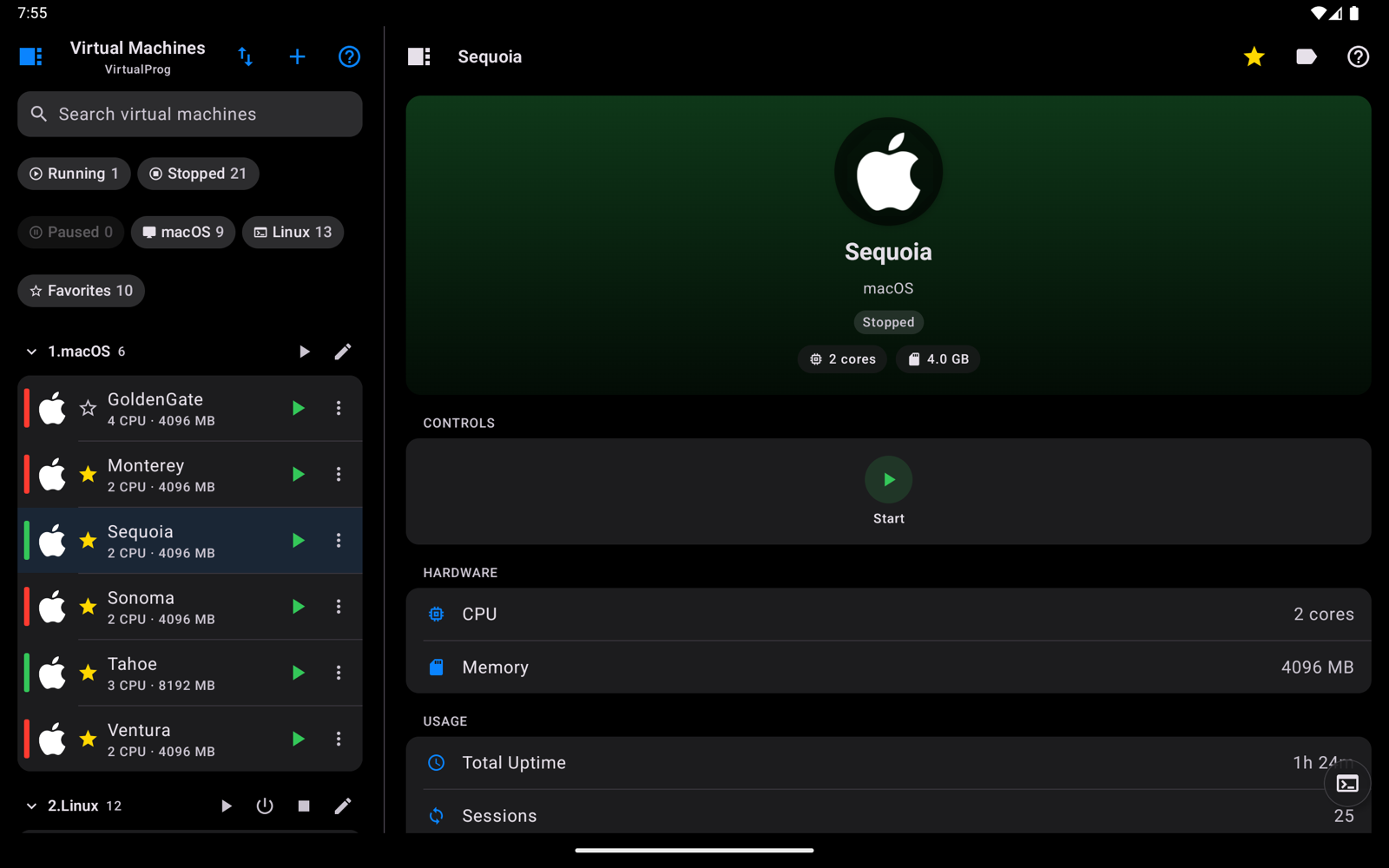
The sidebar button at the left of each title bar steps through the layouts. The VM list's button shows or hides the sidebar; the details' button cycles through all three columns, then the list and details, then the details alone. Below, the sidebar is hidden and only the list and details show.
🖥️ Live Screen
| Area | iPhone / iPad | Android |
|---|---|---|
| Touch | Tap, long-press, pinch, two-finger drag and double-tap, three-finger scroll | The same |
| Mouse, trackpad, stylus | Pointer, scroll wheel and two-finger scroll | The same |
| Screenshot | Share sheet: Save to Photos, AirDrop | Share sheet: Drive, Messages, email, any app |
| Streaming | H.265, H.264 or JPEG; Auto adapts frame rate to the connection | The same |
🔐 Security and Shortcuts
| Area | iPhone / iPad | Android |
|---|---|---|
| App lock | Face ID, Touch ID or device passcode | Fingerprint, face unlock or screen lock (PIN, pattern, password) |
| Automation | Shortcuts app, Siri phrases, Action button | Launcher shortcuts (touch and hold the app icon); no voice or automation yet |
| Keyboard shortcut for the command line | ⌃** or **⌘ |
Ctrl+** or **Meta+ |
❓ Help
The ? button opens this help site on both. On Android the whole site is built into the app, so it works without a connection.